What Is the Jev AI Model? A 6-Step Guide (2026)
Published 9 min read
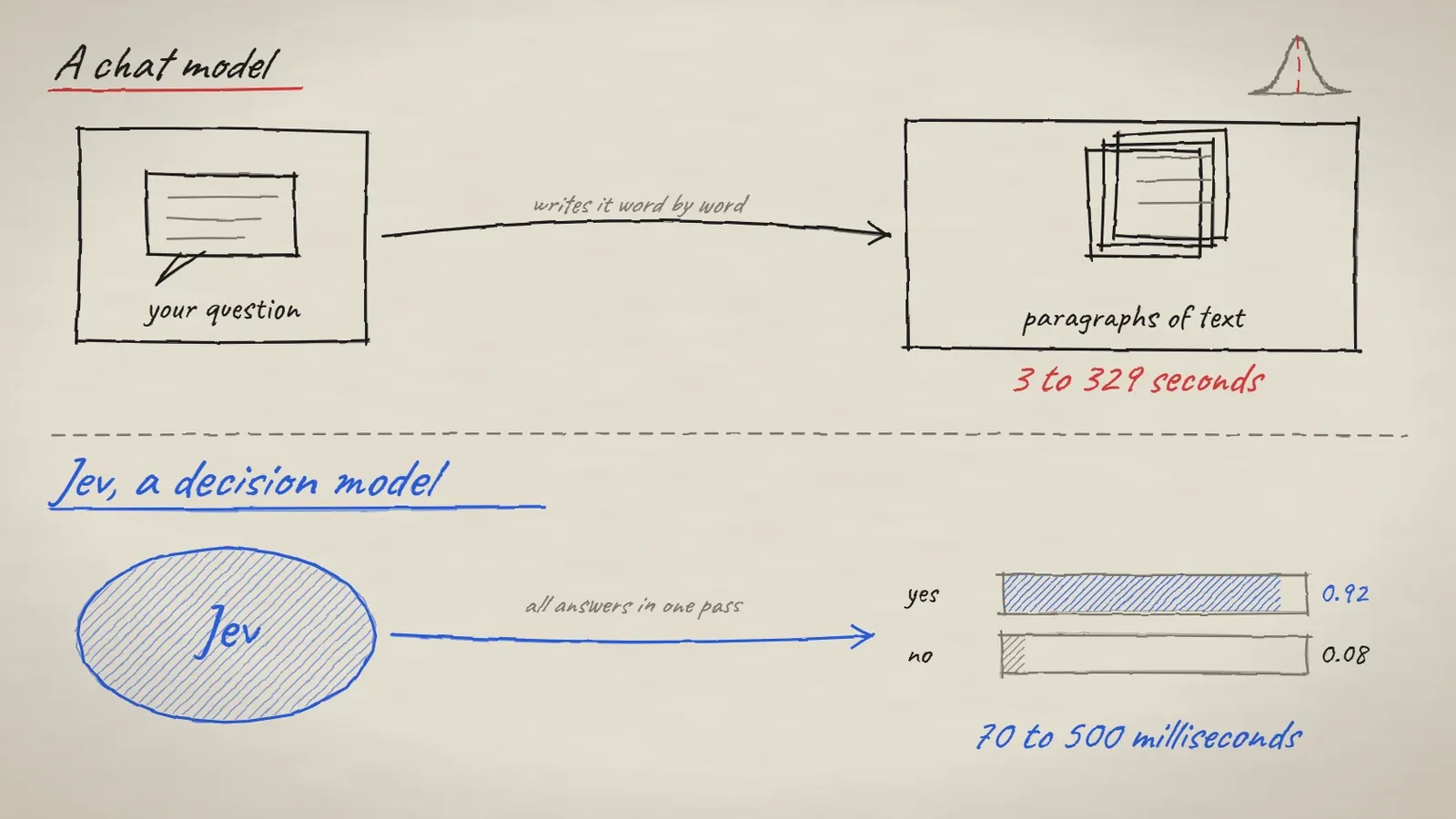
The Jev AI model is a new kind of AI from TypeSafe AI, released in mid-September 2026. It reads text, but it does not write any. It answers with numbers: a yes or no score, a pick from a list, or a rating, each with a confidence level. Software can use those numbers directly, which is the whole point.
Key takeaways
Jev is a "System One" or "decision" model. It gives scores, not sentences.
You send it a piece of text (the "state") and a few typed questions. It answers them all at once.
TypeSafe says it takes 70 to 500 milliseconds and costs $0.042 per million input tokens. Output is free.
It is weak at maths and dates, so keep the arithmetic in your own code.
What is the Jev AI model?
Jev makes decisions instead of writing answers. Its maker calls it a "System One model", after the fast, gut-feeling mode of thinking in Daniel Kahneman's book Thinking, Fast and Slow. Simon Willison, a well-known developer who tried it in the first week, prefers the name "decision model", and so do we. The founder, Diogo Almeida, used to work at OpenAI.
A chatbot like ChatGPT writes a reply one word at a time. Jev takes some text and a question, then hands back a number. TypeSafe sums it up as "unstructured state in, typed probabilistic decisions out." A small note on spelling: it is J-E-V. Search for "Jav AI" and you may land on tools that have nothing to do with this model.
A chat model writes text. Jev returns a score. Speed figures are TypeSafe's own.
How does the Jev AI model work?
First, you send Jev a "state". That is just the text you care about, such as a support ticket, an email or a review. Next, you ask one or more questions about it. Then Jev answers every question at once, because it works out all the answers in parallel instead of word by word. The official docs say a request can hold up to 64,000 tokens of state.
The state can be plain text, a JSON object with named fields, or a list of texts. Jev can also read PNG and JPEG images.
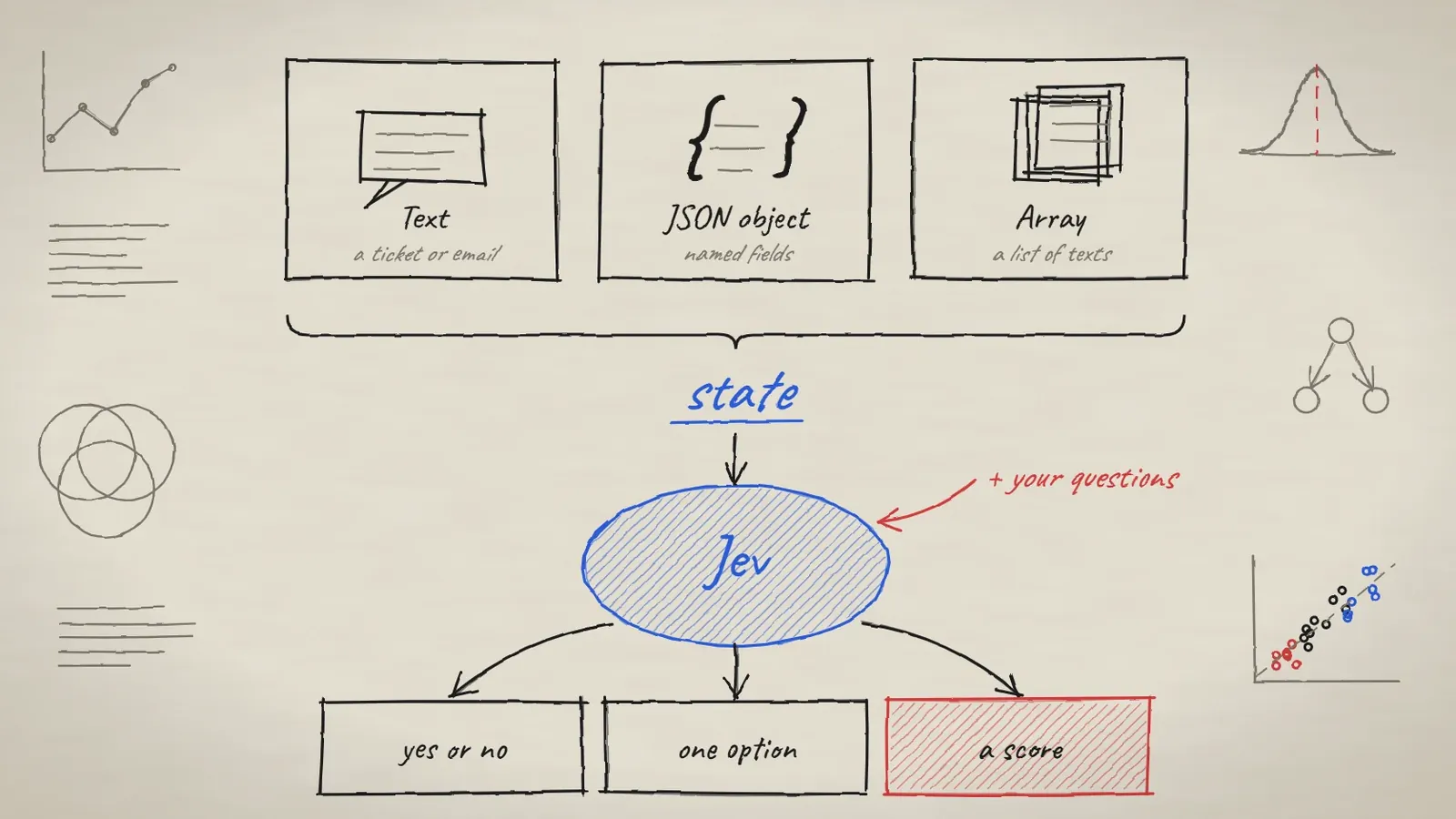
Three input shapes become one state. Jev answers your questions about it.
How to use the Jev AI model: 6 steps
This is the path from a first idea to working code. We haven't run the code ourselves; it follows the official TypeSafe docs, so check it against the current docs before you build on it.
Step 1: Pick one decision with a clear outcome
Start with the decision, not the prompt. Good first choices are narrow ones:
Which team should get this support ticket?
Is this message about a refund?
How urgent is this request?
Does this action need a human to approve it?
A vague goal like "understand this customer" gives you a vague number. "Which of our three teams should handle this?" gives you something you can test.
Step 2: Choose the right Jev question type
Jev has three question types, and picking the right one matters more than anything else you write.
Type | Use it when | You get back |
|---|---|---|
Noul | The answer is yes or no | A number from 0 to 1 |
Choice | The answer is one option from a list | A chance for every option, plus a confidence |
Score | The answer sits on a scale you define | A number that can fall between your levels |
"Noul" is short for Bernoulli, the maths name for a yes or no outcome. Two tips from the docs are worth remembering. A Choice question always picks something, even when no option fits, so add a yes or no question that asks whether any option fits. And a Noul of 0.5 means yes and no are equally likely. It does not mean "medium".

The three question types and the shape of each answer.
Step 3: Get a Jev API key and install the SDK
Create an API key in the TypeSafe console, then install the Python package. TypeSafe also has a JavaScript SDK and a plain HTTP API.
pip install typesafe-sdkSet the key as an environment variable called TYPESAFE_API_KEY. The SDK reads it for you and retries failed calls on its own.
Step 4: Write your first Jev request in Python
This example follows the official quickstart. It sends one ticket and asks all three types of question at once.
from typesafe_sdk import Choice, Noul, Score, TypeSafeClient

ticket = "I was charged twice for my subscription. Please refund the extra payment."

with TypeSafeClient() as client:
    response = client.system_one(
        state={"document": ticket},
        questions={
            "refund": Noul(instructions="Is the customer asking for a refund?"),
            "team": Choice(
                instructions="Which team should handle this?",
                criteria={
                    "billing": "Charges, invoices, payment problems",
                    "technical": "Bugs and errors",
                    "account": "Login and profile problems",
                },
            ),
            "urgency": Score(
                instructions="How urgent is this ticket?",
                criteria=["can wait", "this week", "today"],
            ),
        },
    )

print(response.nouls["refund"].noul)
print(response.choices["team"].choice)
print(response.scores["urgency"].score)
You pick the names (refund, team, urgency), and the answers come back under the same names. The model never sees those names, only your instructions and your option descriptions, so write the descriptions with care.
Step 5: Call the Jev HTTP API with curl
You can skip the SDK and send a request from any language. Here is the smallest useful call from the official docs, using the jev-latest model name:
curl --request POST \
  --url https://api.typesafe.ai/v1/systemone \
  --header 'Authorization: Bearer YOUR_KEY' \
  --header 'Content-Type: application/json' \
  --data '{
    "model": "jev-latest",
    "state": "I was charged twice for my subscription this month. Please refund the extra charge.",
    "questions": {
      "billing": { "type": "noul", "instructions": "Is this message about billing?" }
    }
  }'
The reply holds your answer, such as a Noul of 0.98 for "billing", plus a count of the tokens used.
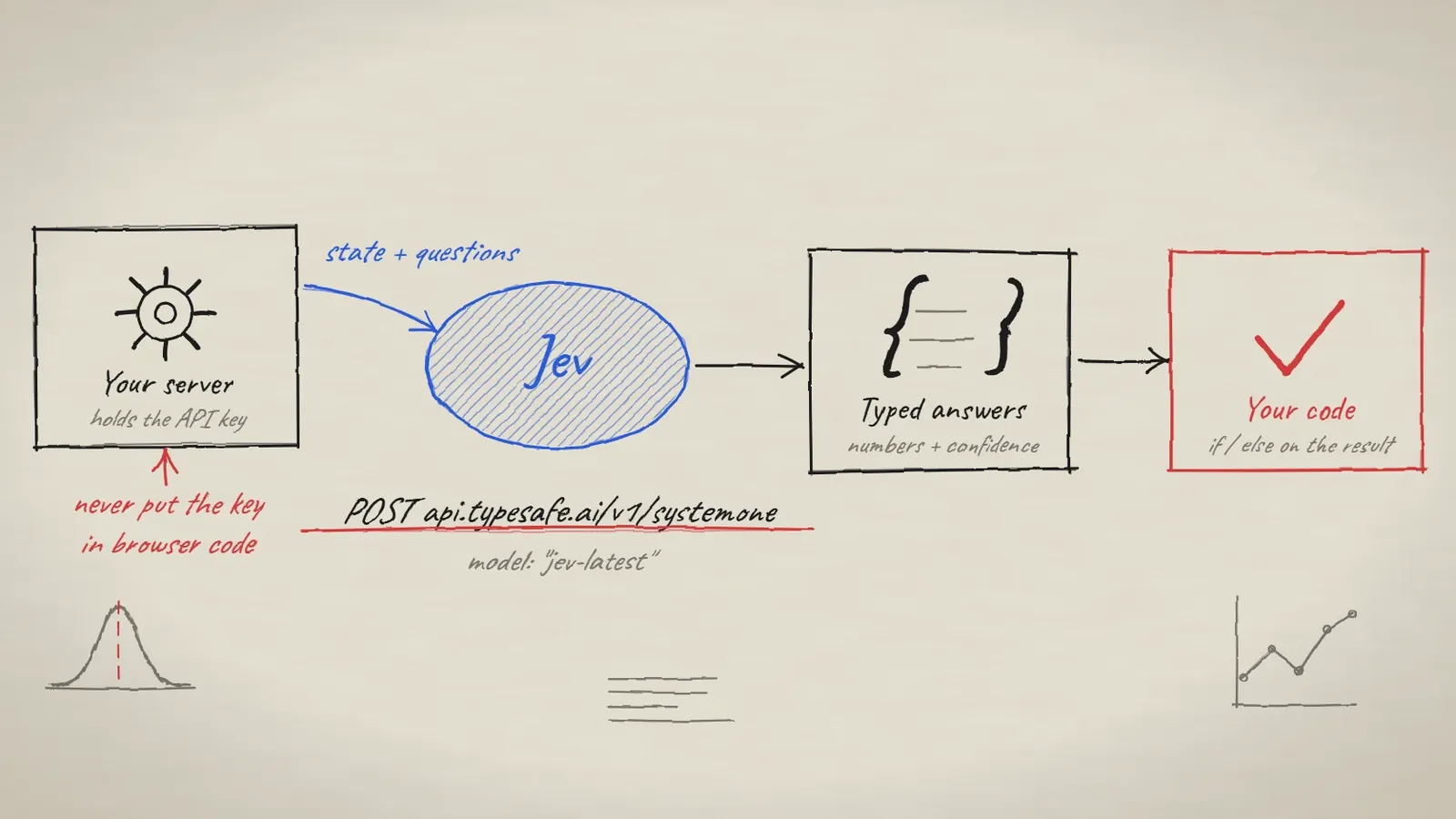
The request path. Keep the key on your server.
Keep your API key on the server. Anything in browser code can be read by anyone who opens the page.
Step 6: Act on Jev's confidence score, not just the answer
The number is only useful when your code decides what to do with it. A simple rule works well: act automatically when confidence is high, send a person the middle cases, and use a safe default when it is low. Thoughtworks describes this idea as a "confidence gate", and engineer Ben O'Mahony suggests placing Jev around a coding agent to check its output.
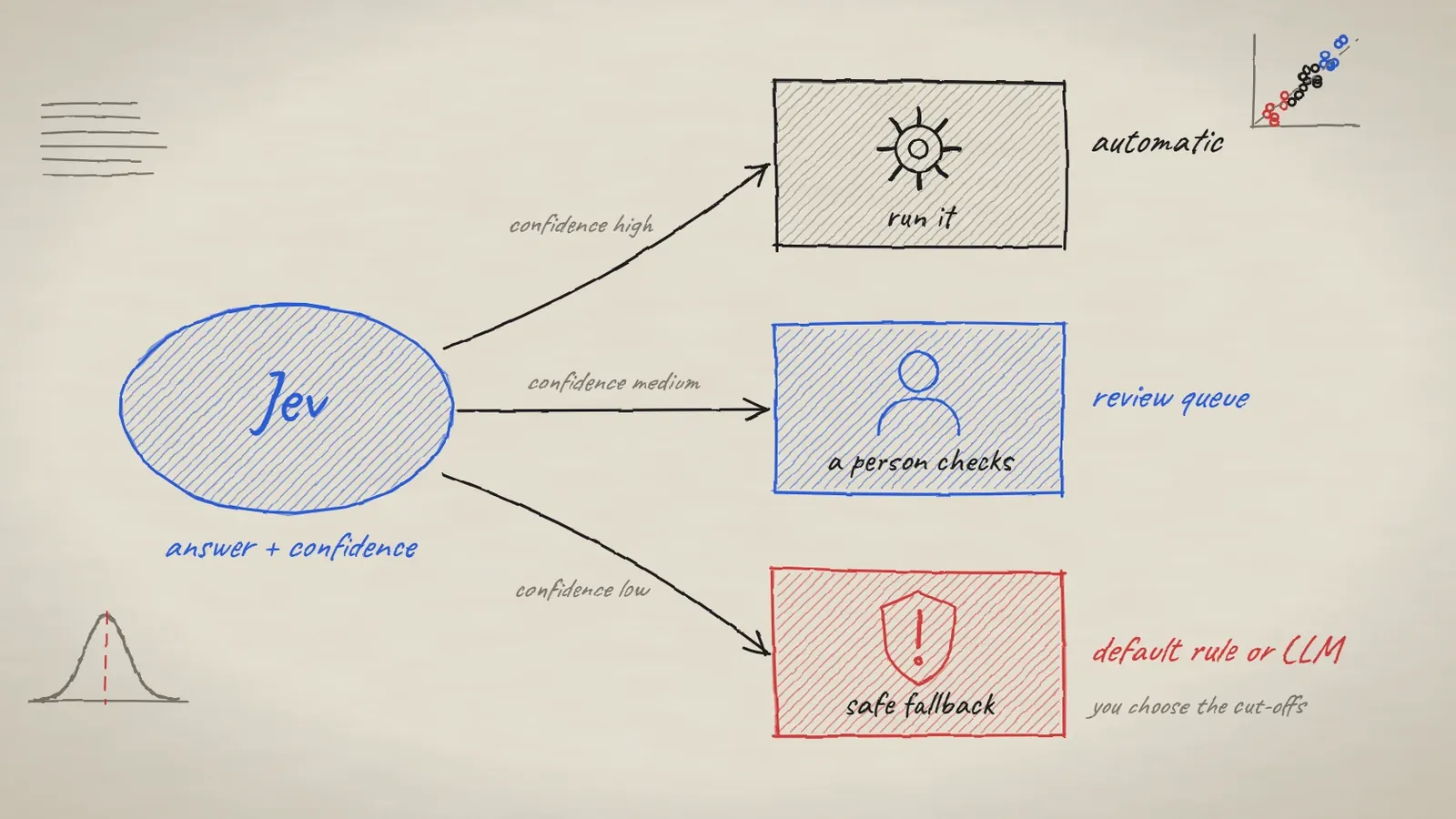
One way to route decisions. You choose where the cut-offs sit.
How accurate and how cheap is the Jev AI model?
Here is the company's own comparison, as reported by GeeksforGeeks from TypeSafe's chart. It averages four workflows and gives a cost per case.
Model | Accuracy | Cost per case |
|---|---|---|
Jev | 67.8% | $0.0004 |
GPT-5.6 Terra | 67.9% | $0.0304 |
GPT-5.6 Sol | 74.1% | $0.0836 |
Claude Opus 5 | 73.1% | $0.1761 |
So Jev matched one big model on accuracy for a tiny fraction of the cost, but the two strongest models still scored higher. An outside team (arXiv, October 8, 2026) ran 13 multiple-choice benchmarks against 19 chatbots. Jev matched frontier chatbots on knowledge and common sense and got the best score on MMLU-Redux and ARC-Challenge. On the MathQA maths word problems it was 17.7 points below the frontier median and scored lower than all 19 chatbots.
The speed, price and accuracy numbers above come from TypeSafe's own launch material. TypeSafe says its speed tests ran from laptops on the US West Coast, and it admits it can't yet prove the low price will last. Test Jev on your own data before you trust any of it.
What are the weaknesses of the Jev AI model?
TypeSafe lists the weak spots itself, in a page it calls "model jaggedness". The fixes are mostly the same: do the hard part in your own code.
Weak spot | What to do instead |
|---|---|
Numbers and maths | Keep the arithmetic in code |
Comparing dates | Pull out the date parts and compare them in code |
Very literal reading | Write the exact condition for every option |
Long inputs full of noise | Filter the text first, send only what the question needs |
Text written to trick it | Treat user text as untrusted and keep a human check on risky actions |
How to test Jev before you go live
Collect about 50 old examples where you already know the right answer, and run them through Jev.
Look at the wrong ones. Rewrite the option descriptions, then run them again.
Pick your confidence cut-offs from that test, not from a guess.
Send the middle cases to a person.
Log every answer and confidence so you can spot drift later.
Because Jev is so cheap, Willison says running hundreds or even thousands of test prompts costs only a few cents, so there is little excuse to skip testing.
Be careful with decisions about people. Jev gives only a number and no reason, so hidden bias can sit inside it. Willison hopes nobody uses it to rank job applicants. Keep a human in charge.
Frequently asked questions
Is the Jev AI model a chatbot like ChatGPT?
No. Jev can't chat or write text. It only returns numbers: yes or no scores, option chances and ratings, each with a confidence level.
Can I ask Jev several questions in one request?
Yes. You can send one state and many questions, and mix the three types. Jev works them out in parallel, so many questions take about as long as one.
Should Jev replace my chat model?
Usually not. Use Jev for fast sorting and checking, and a chat model when you need an explanation or a draft. They work well together, with Jev deciding what the chat model should do next.
Can the Jev AI model hallucinate?
TypeSafe says its output structure rules out type errors, and its launch post says Jev can't hallucinate. A number can still be wrong, though. Check it against your own examples.
Is there an open-source version of Jev?
Not Jev itself. But open-weight models in the same style exist, including Kev and Laya. You can read more about open models in our open-source models section.
Is the Jev AI model worth trying?
Jev is a narrow tool that does one job very quickly and cheaply. If you need to sort, label, score or route text, it is worth a try. If you need an essay or an explanation, use a chat model. We'll keep checking new releases, and you can follow them in our new AI models section.
Sources
- TypeSafe AI: Introducing System One models and Jev (official launch post)
- TypeSafe docs: Models (Jev 1.14 and 1.13)
- TypeSafe docs: Model jaggedness
- Simon Willison: Jev introduces a new shape of LLM (21 September 2026)
- Thoughtworks: Jev and the rise of decision models (12 October 2026)
- arXiv 2610.11978: Specialized Decision Models vs. General-Purpose LLMs, Benchmarking Jev
Checked on 2026-11-08