What Is Model Context Protocol (MCP)? Explained Simply
Published 11 min read

What is Model Context Protocol? It is an open standard, also called MCP, that lets an AI app connect to outside systems such as files, databases and tools. A tool maker builds one MCP server that any app speaking MCP can use. Anthropic released it on 25 November 2024.
Key takeaways
- MCP is a shared set of rules for how an AI app talks to outside tools and data.
- It has three roles: a host (the AI app), a client (one connection) and a server (the tool side).
- A server can offer tools, resources and prompts. A different part of the system controls each one.
- The newest version, 2026-07-28, makes MCP stateless, so there is no start-up handshake any more.
- A local server is a program on your computer, so install only servers you trust.
What is Model Context Protocol in simple words?
Model Context Protocol is a standard way for an AI app to reach things outside the chat box. The official docs call it "an open-source standard for connecting AI applications to external systems". Those systems can be files, databases, search tools or ready-made prompts.
The docs also give a picture: "Think of MCP like a USB-C port for AI applications." I like it because it is easy to see.
Before USB-C, each gadget came with its own charger. Before MCP, each AI app needed its own custom code for each tool. With MCP, the tool maker writes one server. Any app that speaks MCP can plug into it.
MCP is neither an AI model nor an app. It is the set of rules both sides follow when they talk. The docs say MCP only covers how context is exchanged. It does not decide how an app uses the AI model or manages that context.
Anthropic made MCP public in November 2024. On 9 December 2025 it gave the project to the Agentic AI Foundation, a fund under the Linux Foundation.
Why did AI apps need MCP?
AI apps needed MCP because every new data source used to need its own custom link. A model can write a good answer. It still cannot see your calendar, your code folder or your company database unless someone builds a bridge to it. Anthropic's launch post said it plainly: "Every new data source requires its own custom implementation, making truly connected systems difficult to scale."
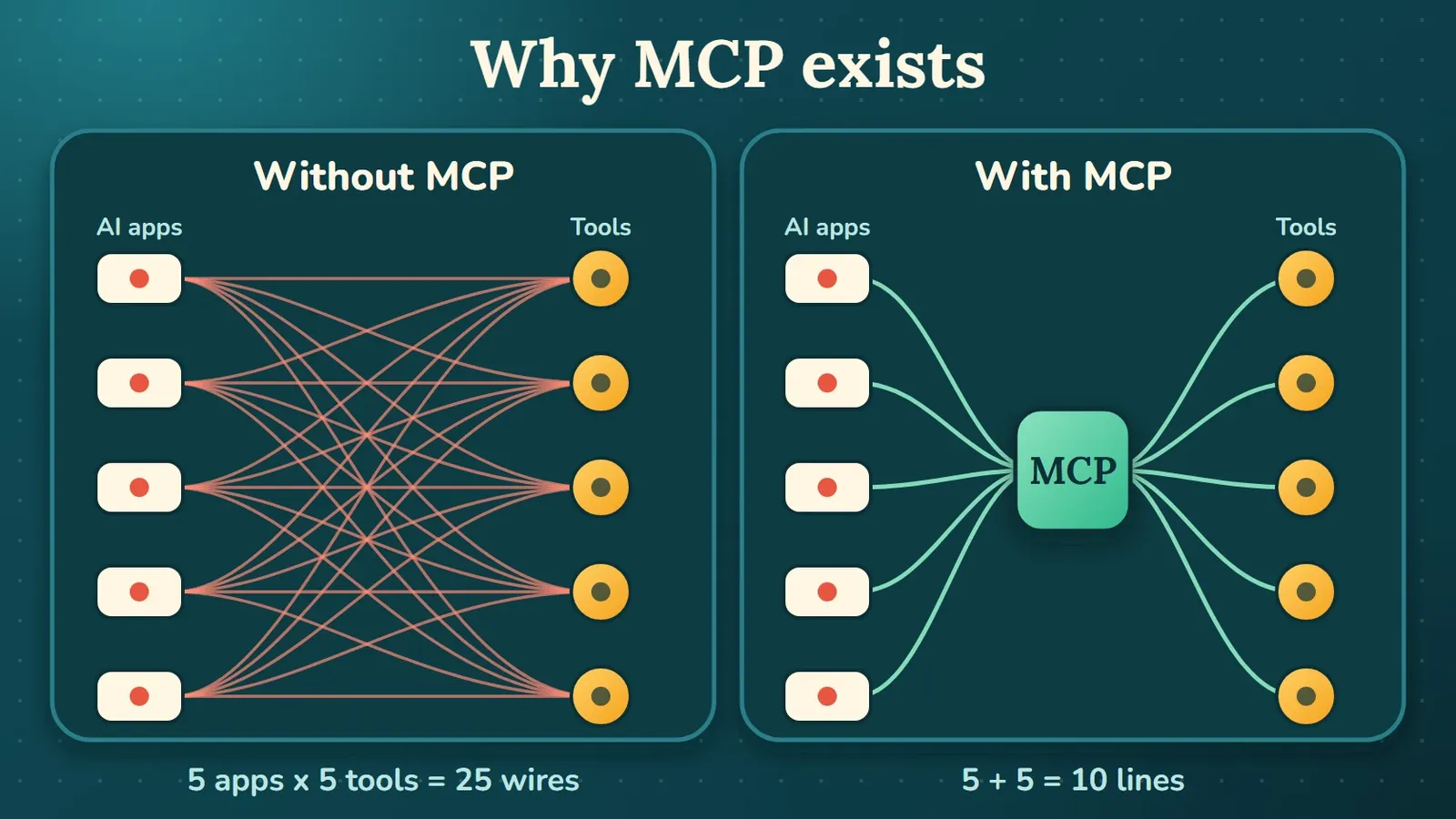
With MCP you build each link once, in a shared format, then reuse it everywhere. The numbers in the table below are my own example, not a measurement.
| Case | Without MCP | With MCP |
|---|---|---|
| 10 AI apps and 10 tools | Up to 100 custom links | 10 clients and 10 servers |
| You add one new tool | Build a link for each app, so 10 more links | Build one server |
| You add one new AI app | Link it to each tool, so 10 more links | Make the app speak MCP once |
How does MCP work: host, client and server?
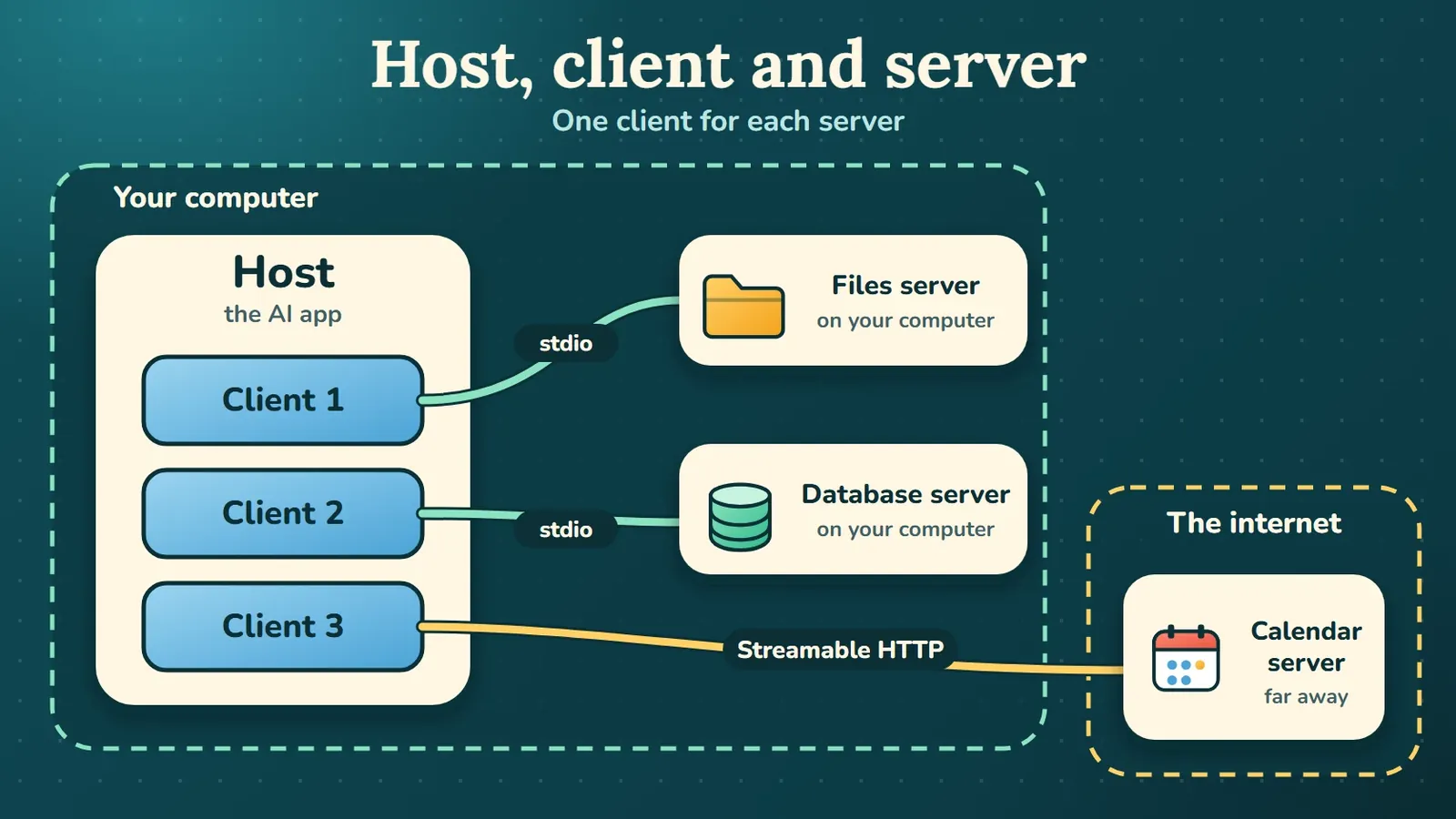
MCP has three parts: a host, a client and a server. The architecture page of the docs describes them like this.
| Part | What the docs say it does | Example |
|---|---|---|
| Host | The AI application that coordinates and manages one or more clients | Claude Desktop or Claude Code |
| Client | Keeps a connection to one server and gets context from it for the host | A piece inside the host |
| Server | A program that provides context to clients | A files server or a database server |
The host creates one client for each server. Each client keeps its own connection. So if you connect three servers, the host runs three clients.
MCP also has two layers. The data layer sets the rules for the messages, such as what tools, resources and prompts are. The transport layer carries those messages. The docs name two transports.
| Transport | How it works | Where you see it |
|---|---|---|
| Stdio | Uses standard input and output streams between processes on the same machine | Servers that run on your own computer |
| Streamable HTTP | Uses HTTP POST for messages from the client, with optional Server-Sent Events for streaming | Servers that run somewhere else |
For remote servers, the docs say MCP recommends OAuth to get access tokens.
What does an MCP message look like?
An MCP message is a small piece of JSON in the JSON-RPC 2.0 format. The client sends a request and the server sends a response. Here is the example from the docs, where a client asks a weather tool for the weather in San Francisco. I did not run this one myself, so I am copying it from the architecture page.
{
  "jsonrpc": "2.0",
  "id": 3,
  "method": "tools/call",
  "params": {
    "name": "weather_current",
    "arguments": {
      "location": "San Francisco",
      "units": "imperial"
    },
    "_meta": {
      "io.modelcontextprotocol/protocolVersion": "2026-07-28",
      "io.modelcontextprotocol/clientInfo": {
        "name": "example-client",
        "version": "1.0.0"
      },
      "io.modelcontextprotocol/clientCapabilities": {
        "elicitation": {}
      }
    }
  }
}
The server answers with a result that holds the text of the weather report:
{
  "jsonrpc": "2.0",
  "id": 3,
  "result": {
    "resultType": "complete",
    "content": [
      {
        "type": "text",
        "text": "Current weather in San Francisco: 68°F, partly cloudy with light winds from the west at 8 mph. Humidity: 65%"
      }
    ]
  }
}
Read the request one part at a time.
methodsays what the client wants. Here it istools/call, which means "run a tool".nameandargumentssay which tool to run and with what input._metacarries the protocol version and the client details. In the newest version every request carries them, so the server does not have to remember earlier requests.idties the response to the request. The answer comes back insideresult.
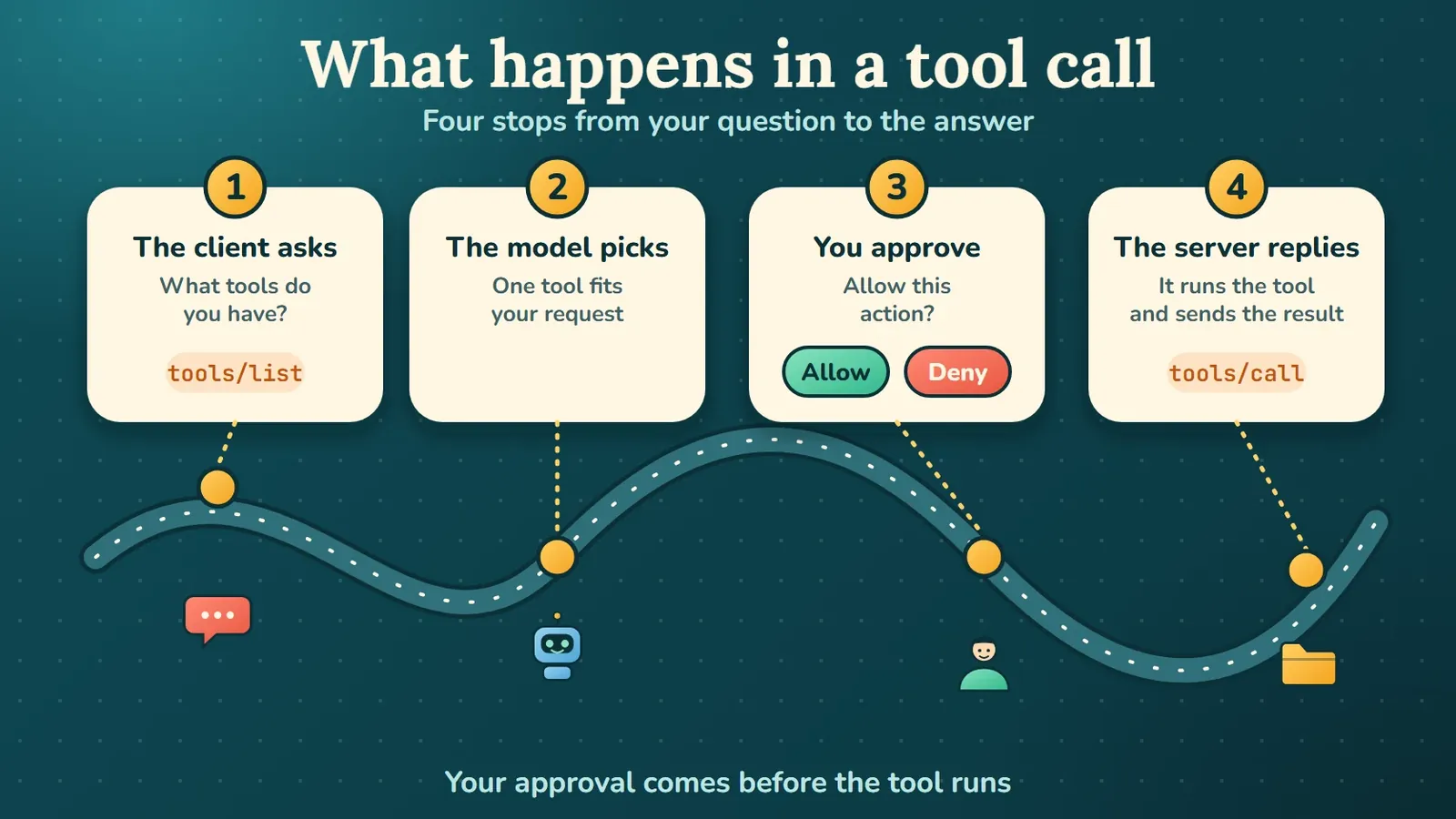
A tool call usually goes in four steps. First, the client asks the server for its tools with tools/list. Next, the AI model decides that one tool can help with your request.
Then the host may ask you to approve the action, because the docs say tools may require user consent before they run. Finally, the client sends tools/call, the server runs the tool and the answer comes back.
What can an MCP server offer: tools, resources and prompts?
A server can offer three kinds of things: tools, resources and prompts. The server concepts page of the docs puts them in one table, including who controls each one.
| Kind | What it is | Who controls it | Main methods |
|---|---|---|---|
| Tools | Functions the AI model can call, such as a file action or a database query | The model | tools/list, tools/call |
| Resources | Read-only data that gives the model context | The application | resources/list, resources/read |
| Prompts | Ready-made instruction templates | You | prompts/list, prompts/get |
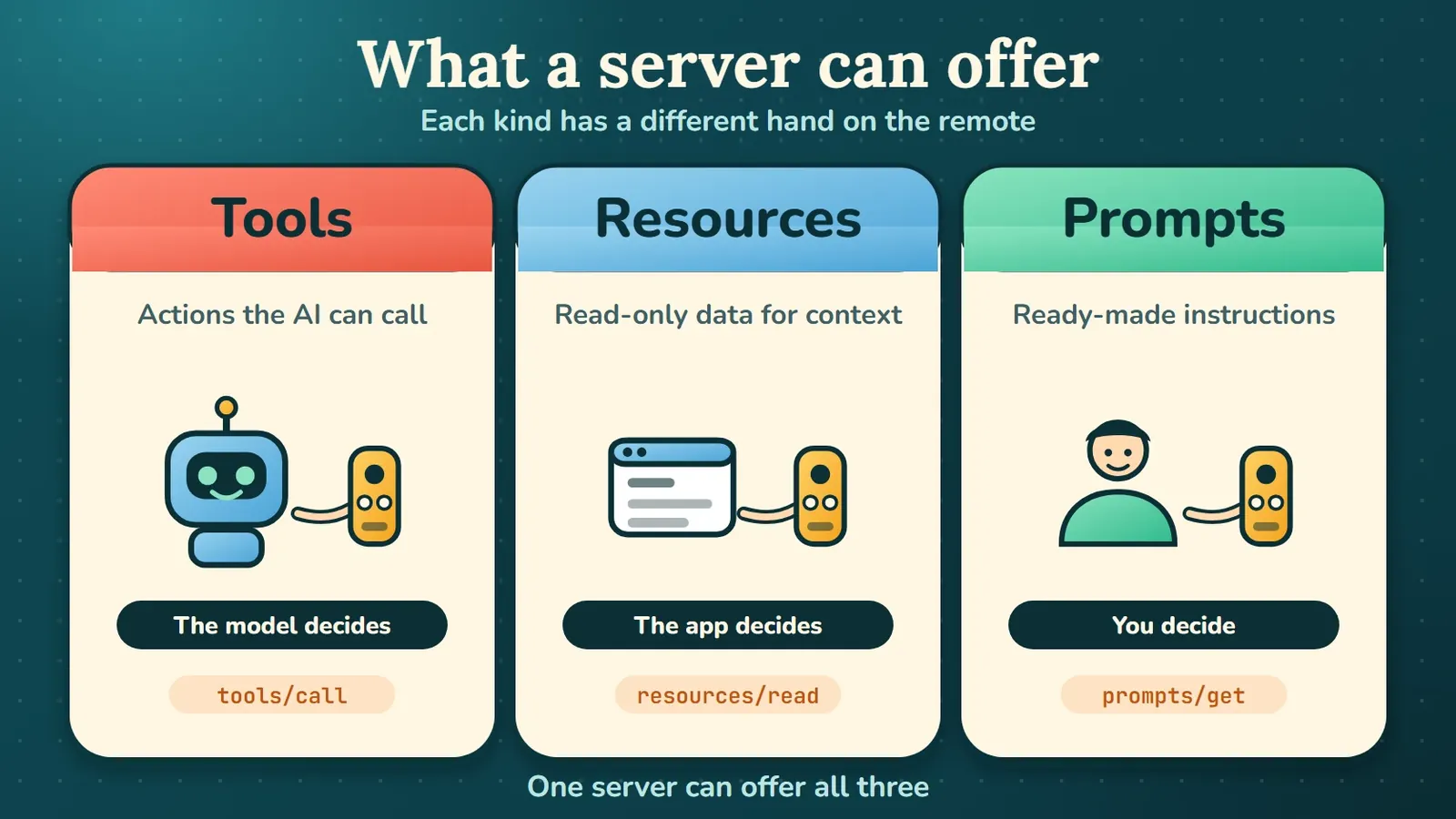
Look at the third column. The model decides when to call a tool. The app decides how to pull in a resource. You choose a prompt yourself.
Servers can also ask you for more information through a feature called elicitation. Roots and sampling, two older client features, are marked deprecated as of version 2026-07-28, so new apps should not add them.
Where is MCP now?
What changed in the newest MCP version?
The newest version, 2026-07-28, makes MCP stateless. That means every request carries all the information the server needs, so servers infer nothing from earlier requests. The changelog lists these main changes.
| Change | What it means |
|---|---|
| Handshake removed | There is no initialize step any more. Each request carries its version and client details. |
| Sessions removed | The Mcp-Session-Id header is gone from Streamable HTTP. |
New server/discover | Servers must say which versions, features and identity they have. |
| HTTP+SSE deprecated | The older transport should give way to Streamable HTTP. |
| Roots, sampling and logging deprecated | New apps should not add support for them. |
The docs pages I read do not show a release date for this version, so I only use its name. SDKs also adopt new revisions on their own schedules, says the SDK page.
When I ran the official filesystem server on 9 November 2026, it still used the old start-up handshake with protocol version 2025-06-18. So the server you install today may not match the newest spec yet.
Who uses MCP today?
MCP is now used by many of the big AI products. Anthropic's post from 9 December 2025 says it has been adopted by ChatGPT, Cursor, Gemini, Microsoft Copilot and Visual Studio Code, among others. The same post says there were more than 10,000 active public MCP servers and more than 97 million monthly SDK downloads across Python and TypeScript. These are Anthropic's own numbers, so treat them as the vendor's claim.
The Agentic AI Foundation was co-founded by Anthropic, Block and OpenAI.
To build a server yourself, use the official SDKs. The SDK page puts TypeScript, Python, C#, Go, Rust and Ruby at the top tier. Java is at the second tier. Swift, PHP and Kotlin are at the third.
Is MCP safe to use?
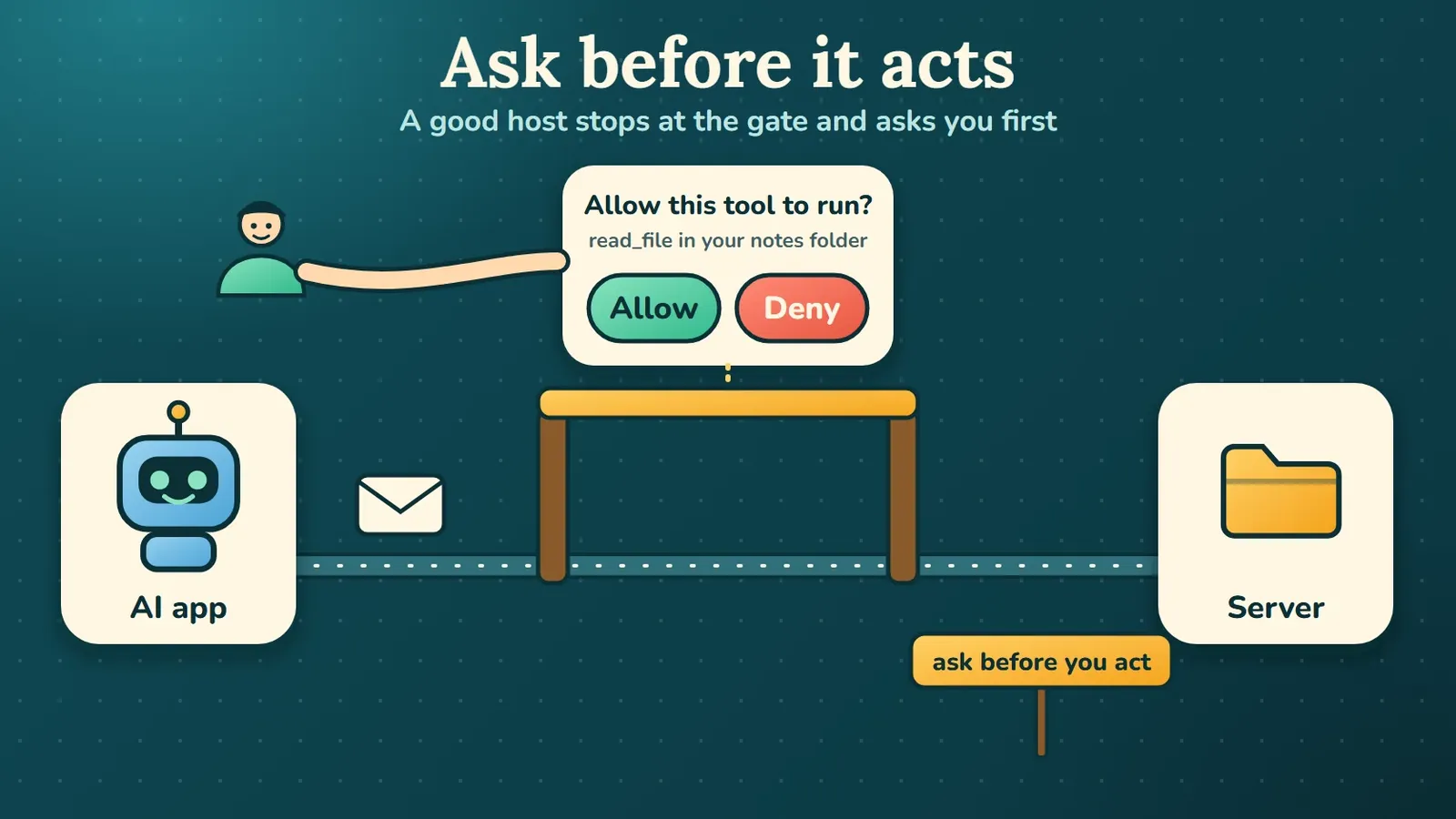
MCP is built to keep a person in control. Still, the safety of a setup depends on the servers you add and the permissions you give. The core spec says hosts must get explicit user consent before they invoke any tool. It also says tool descriptions should be treated as untrusted unless they come from a trusted server.
The security best practices page names several real risks. Here are the ones that matter most for a beginner.
- A confused deputy attack, where a proxy server is tricked into acting for the wrong person. The docs say proxy servers must get consent for each client.
- Token passthrough. The docs say an MCP server must not accept tokens that were not issued for it.
- A compromised local server. If an app offers one-click setup of local servers, the docs say it must ask for consent before it runs commands.
One more warning from the client concepts page: roots tell a server where to focus, but they are not a security boundary. Real limits must come from the operating system, through file permissions or a sandbox.
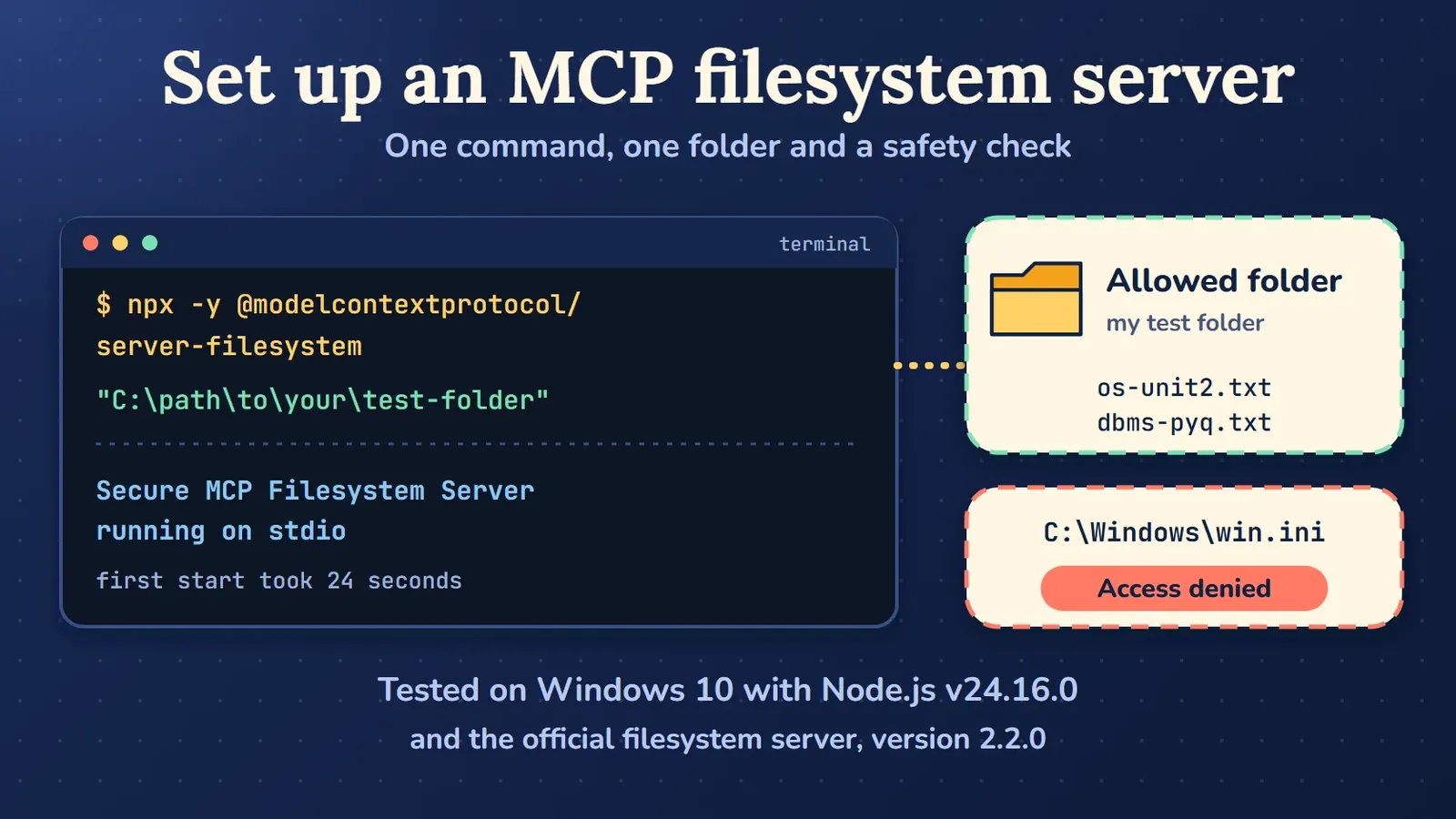
To see how a real server handles limits, I started the official filesystem server in a throwaway folder. Then I asked it to read C:\Windows\win.ini, a file outside that folder. It refused with the message "Access denied - path outside allowed directories". That is the server enforcing its own rule, which is what you want, but it is only one server.
A local MCP server is a program that runs on your own computer. Install servers only from sources you trust. Share only the folders you are happy for an AI to touch. Read each approval prompt before you click allow.
What I tried on my own laptop
On 9 November 2026, on a Windows 10 laptop with Node.js v24.16.0, I ran the official filesystem server with npx. The first start took about 24 seconds because npx had to download the package. I asked the server for its tools and it listed 16. I then asked it to list a test folder, which showed my two test files.
I did not try Claude Desktop, remote servers, resources or prompts, so anything about those in this post comes from the docs.
Frequently asked questions
Is MCP an AI model?
No. MCP is a set of rules for how an AI app talks to outside tools and data. The model still does the thinking.
Who made MCP?
Anthropic made MCP and released it on 25 November 2024. Since 9 December 2025 it has lived under the Agentic AI Foundation, which is part of the Linux Foundation.
Is MCP the same as an API?
No. A tool on an MCP server can call a normal API for you. MCP is the shared layer between the AI app and that tool, so every app can talk to every server in the same way.
Is MCP a framework?
MCP itself is a protocol, which means a set of rules. The SDKs and frameworks are code libraries that follow those rules. This post carries the framework tag because many people search for MCP under that word.
Do I need to code to use MCP?
Not to use a ready-made server. In some apps you edit a settings file to add it. To build your own server you need to code. The official SDKs cover several languages.
What I would do next
I would start small. Pick one official server, point it at a throwaway folder and watch what the AI app asks before it acts. Then read the architecture page of the docs once, because it is short and clear.
If you study AI at RGPV, the artificial intelligence subject page has notes and previous year papers. You can find more guides in the Learning Resources section of the blog.
Sources
- Model Context Protocol docs: What is MCP?
- Model Context Protocol docs: Architecture overview
- Model Context Protocol docs: Understanding MCP servers
- Model Context Protocol docs: Understanding MCP clients
- Model Context Protocol specification: Key changes in 2026-07-28
- Model Context Protocol docs: Security best practices
- Model Context Protocol docs: SDKs
- Anthropic: Introducing the Model Context Protocol (25 November 2024)
- Anthropic: Donating MCP and establishing the Agentic AI Foundation (9 December 2025)
Checked on 2026-11-10
Comments
No comments yet. Start the discussion.