How to install Hermes Agent on Windows (no WSL needed)
Published 9 min read

To install Hermes Agent on Windows, use the Hermes Desktop installer or one PowerShell command, with no WSL2 needed. Hermes is a free, open-source AI agent from Nous Research. The software costs nothing, but the model you connect to it may. We checked the official docs on 15 November 2026.
Key takeaways
- The desktop installer needs Windows 11 22H2 or newer. On Windows 10, use the PowerShell script.
- WSL2 is optional. The official Windows guide calls it an alternative. A guide on the Kimi site says you need it. That one looks out of date.
- The software is free under the MIT license. The model behind it is where money goes.
- Kimi, Hugging Face and Nous Portal all work as the model. Pick one.
- I did not install Hermes for this post. Every step comes from the official docs.
What is Hermes Agent?
Hermes Agent is an AI agent that runs on your own computer and can run terminal commands for you. Nous Research builds it. The official site says it keeps a memory of past work and writes reusable skills from what it has done. It also works from messaging apps such as Telegram and Discord.
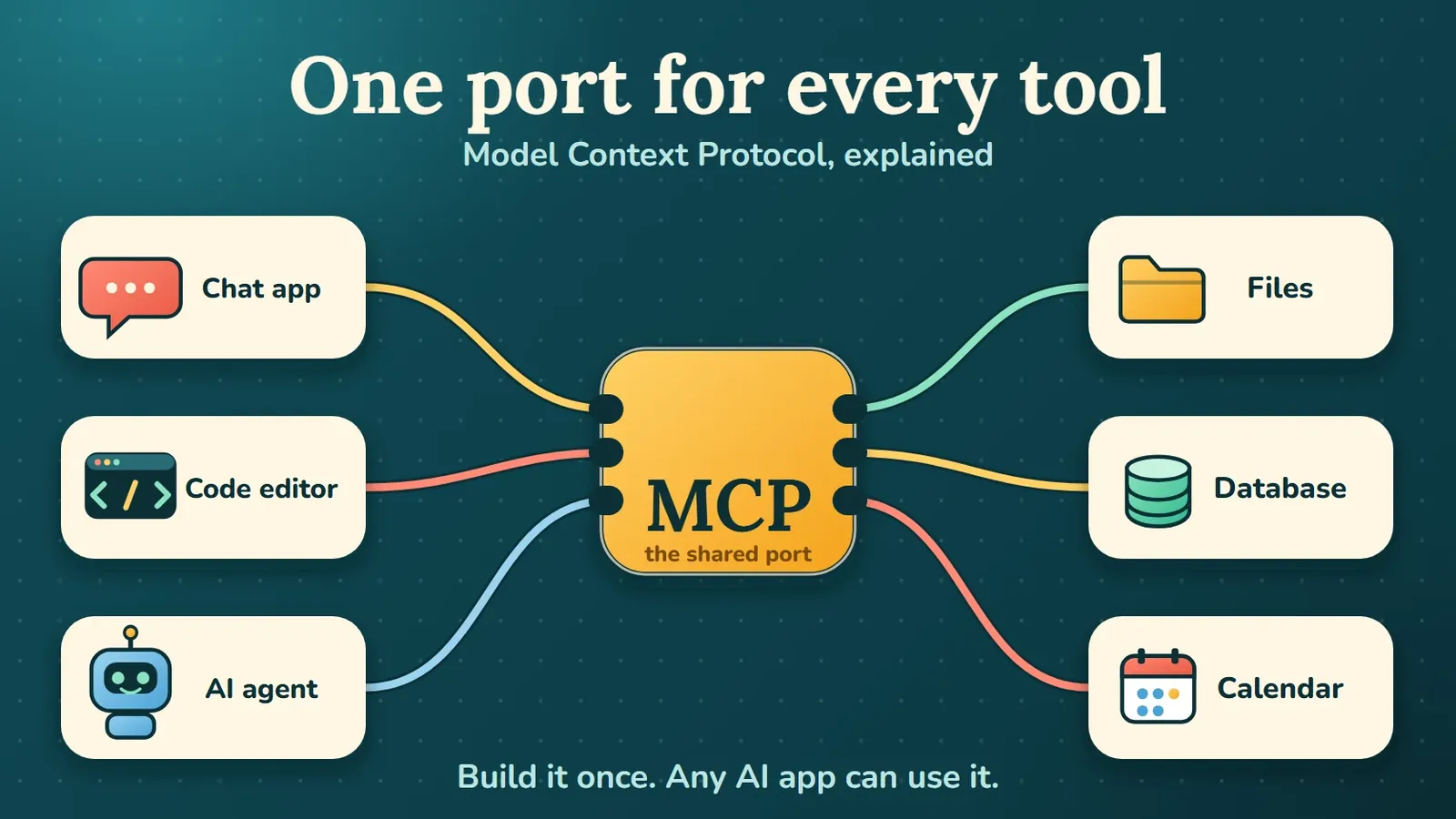
On Windows it runs commands through Git Bash, the same way Claude Code does, says the official Windows guide. If you have used Claude Code or Codex, Hermes sits in the same group of tools. If the word agent is new to you, read our post on what Model Context Protocol is first. It shows how AI apps reach tools.
How is it different from OpenClaw?
OpenClaw is another open-source agent. The Kimi guide and a comparison on Crewmark AI agree on the split. Pick Hermes for one assistant that remembers your work. Pick OpenClaw for many agents behind one gateway.
This table is the Kimi guide's view. We did not test it.
| What | Hermes Agent | OpenClaw |
|---|---|---|
| Core design | One agent with memory that grows | A gateway that manages many agents |
| Learning | Built-in memory and skills | Relies more on tools and plugins |
| Many agents | Limited, one main agent plus helpers | Built in |
| Setup | Moderate | Higher, because of the gateway |
Both are MIT licensed, says the official comparison page. If OpenClaw is already on your laptop, Hermes can offer to import your old settings.
Is Hermes Agent free to use?
The software is free. The model you connect to it may cost money. Hermes runs on your laptop but still needs a language model to think. That model usually sits on someone else's server.
An independent review at AI Tested Guide ran Hermes for two weeks on three setups. Its summary matches this: free software, real running costs.
Where does the money go?
| Route | What the docs say | What I could not check |
|---|---|---|
| Kimi | Kimi suggests adding $20 or more for Tier 2, which it says gives lower delay and steadier long tasks | Your exact price in your own currency |
| Hugging Face | One token reaches hundreds of open models from 17 or more providers | How much free use your account gets |
| Nous Portal | One subscription covers 300 or more models plus a tool gateway | The subscription price |
Open each billing page on the day you sign up. Prices and free limits change.
What do you need before you install Hermes Agent on Windows?
You need a Windows laptop with internet and an account with one model provider. Your Windows version decides the install path. The official guide says the desktop package needs Windows 11 22H2 or later. Windows 10 works through the source script.
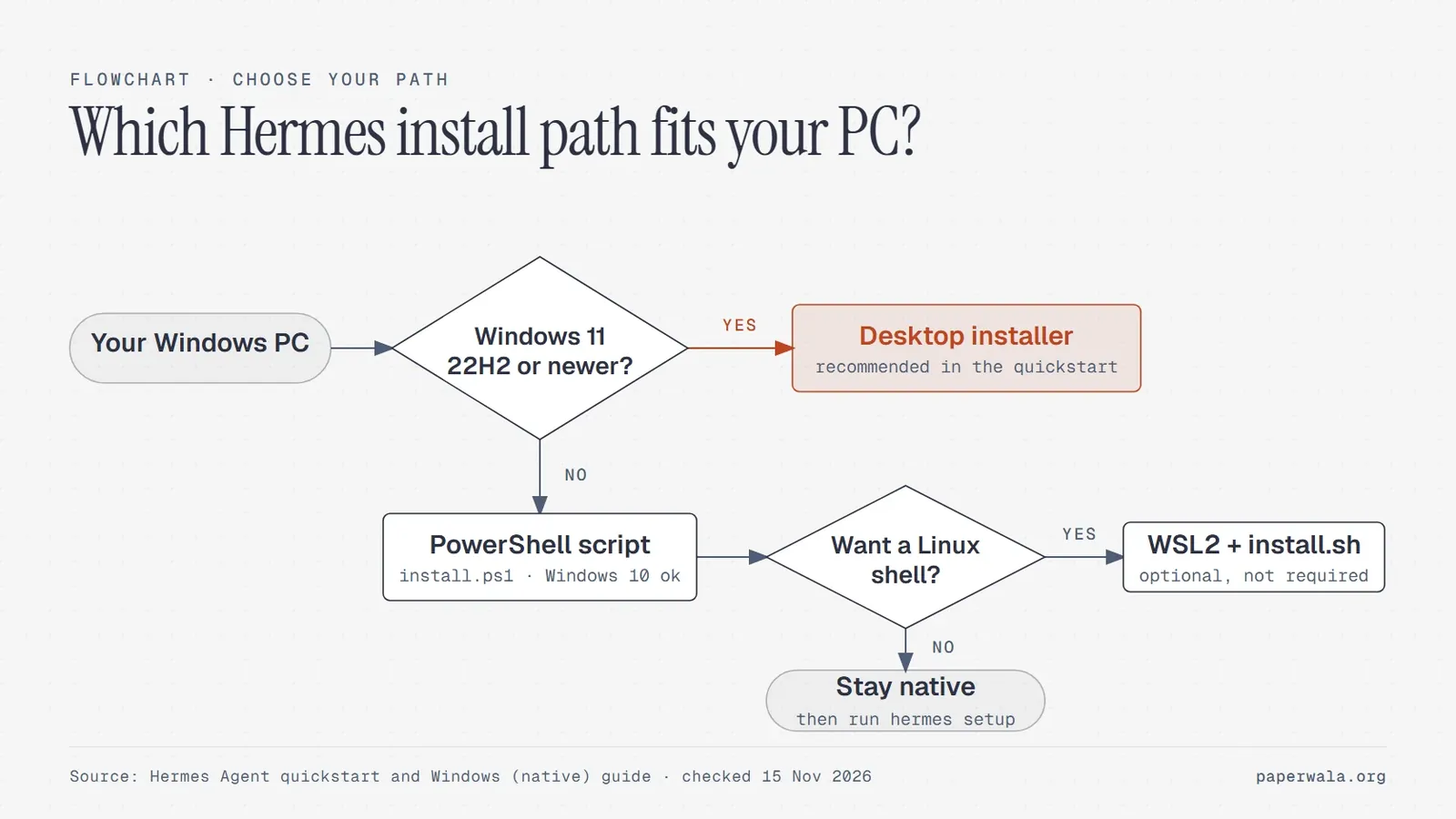
| Your PC | Desktop installer | PowerShell script |
|---|---|---|
| Windows 11, 22H2 or newer | Works. The quickstart recommends it | Also available |
| Windows 10 | Not supported | Supported |
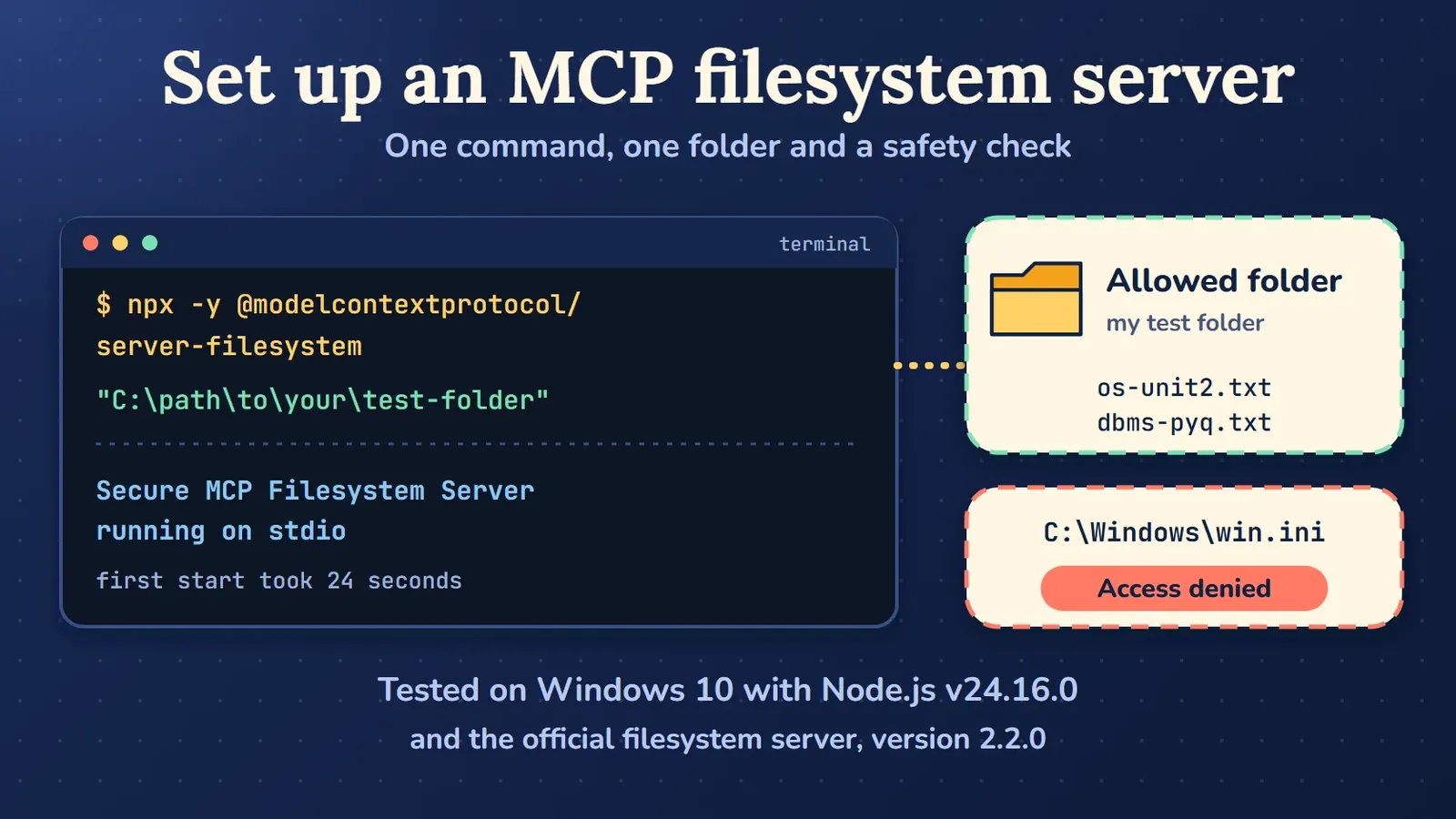
Make a test folder too, with files you can afford to lose, because the agent can run commands. The installation guide has a Prerequisites part as well, so read it before you run anything.
How do you install Hermes Agent on Windows?
The quickstart gives two choices. I did not run either, so these steps come straight from the docs.
Step 1: pick an install path
First, pick one. The desktop installer is the easy path. Download it from the Hermes website and open the file with Windows App Installer.
The other choice installs only the command line tool. Run this in PowerShell:
iex (irm https://hermes-agent.nousresearch.com/install.ps1)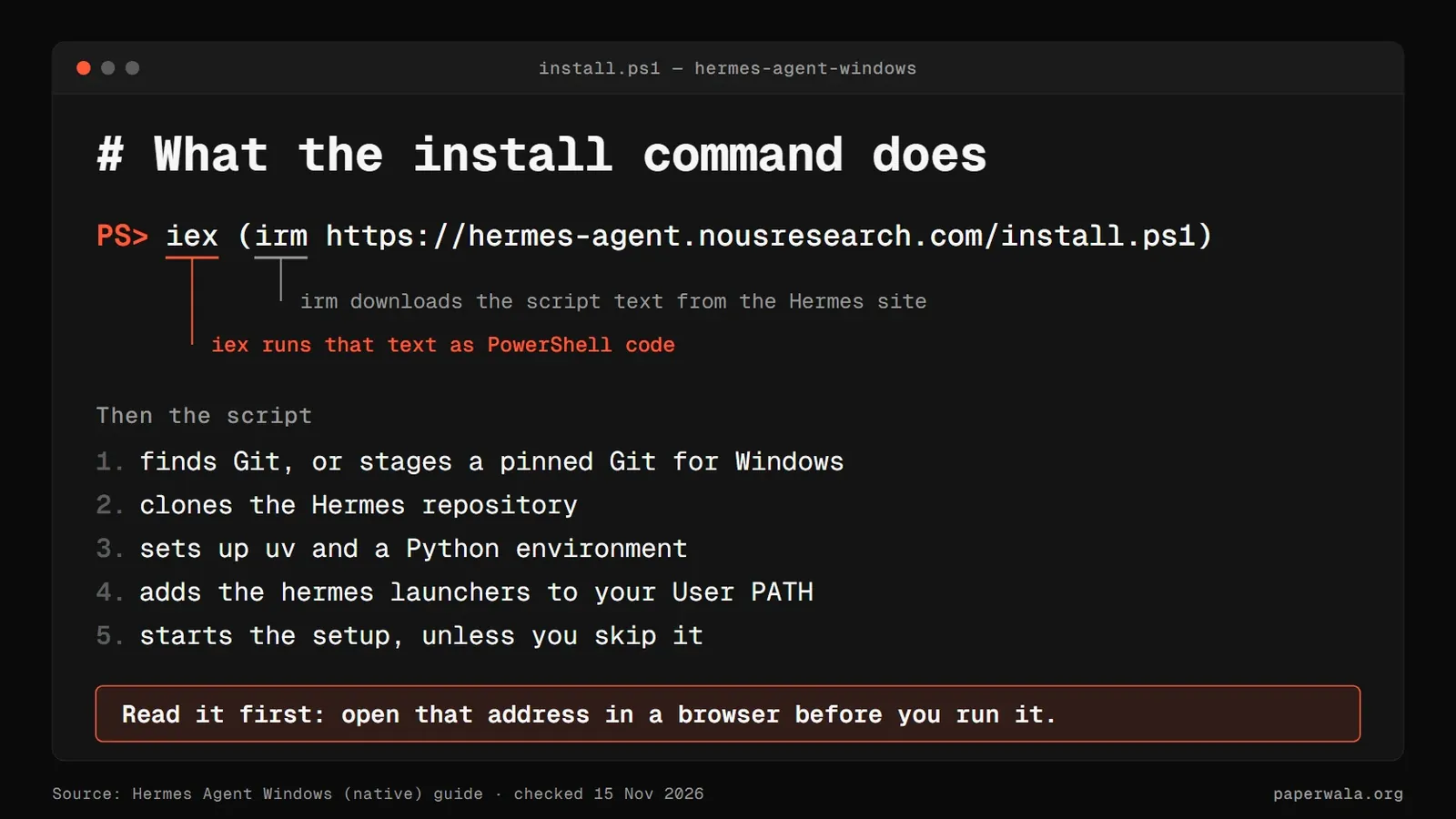
That command downloads a script from the internet and runs it. Open the address in your browser and read the script first.
You do not need to install Git by hand. The guide says the script looks for Git and stages a pinned Git for Windows when it is missing.
Step 2: what about WSL2?
The Kimi guide and the official quickstart disagree here. That was the first thing I wanted to settle. Kimi says Windows users need WSL2.
The quickstart lists a native Windows command and keeps WSL2 as a choice with the Linux command. The Windows guide calls WSL an alternative. So WSL2 is optional.
If you want it, here is the official command for Linux, macOS or WSL2.
curl -fsSL https://hermes-agent.nousresearch.com/install.sh | bashStep 3: run the setup
When the install ends, run hermes setup. The quickstart says to use it the first time. If you already know your provider, run hermes model instead. Then start a real chat and check that it answers.
The quickstart has one rule here: if Hermes cannot finish a normal chat, do not add features yet. Messaging apps and scheduled jobs can wait.
Step 4: check that the install worked
Run hermes doctor. The installation guide says it reports what is missing and how Hermes was installed. If something failed, the installer also writes its output to logs/install.log inside the Hermes data folder. Add -Verbose to the install command to see every line as it runs.
How do you connect a model to Hermes Agent?
You give Hermes a key or token from a model provider. A key is a long secret code that lets one program use another service.
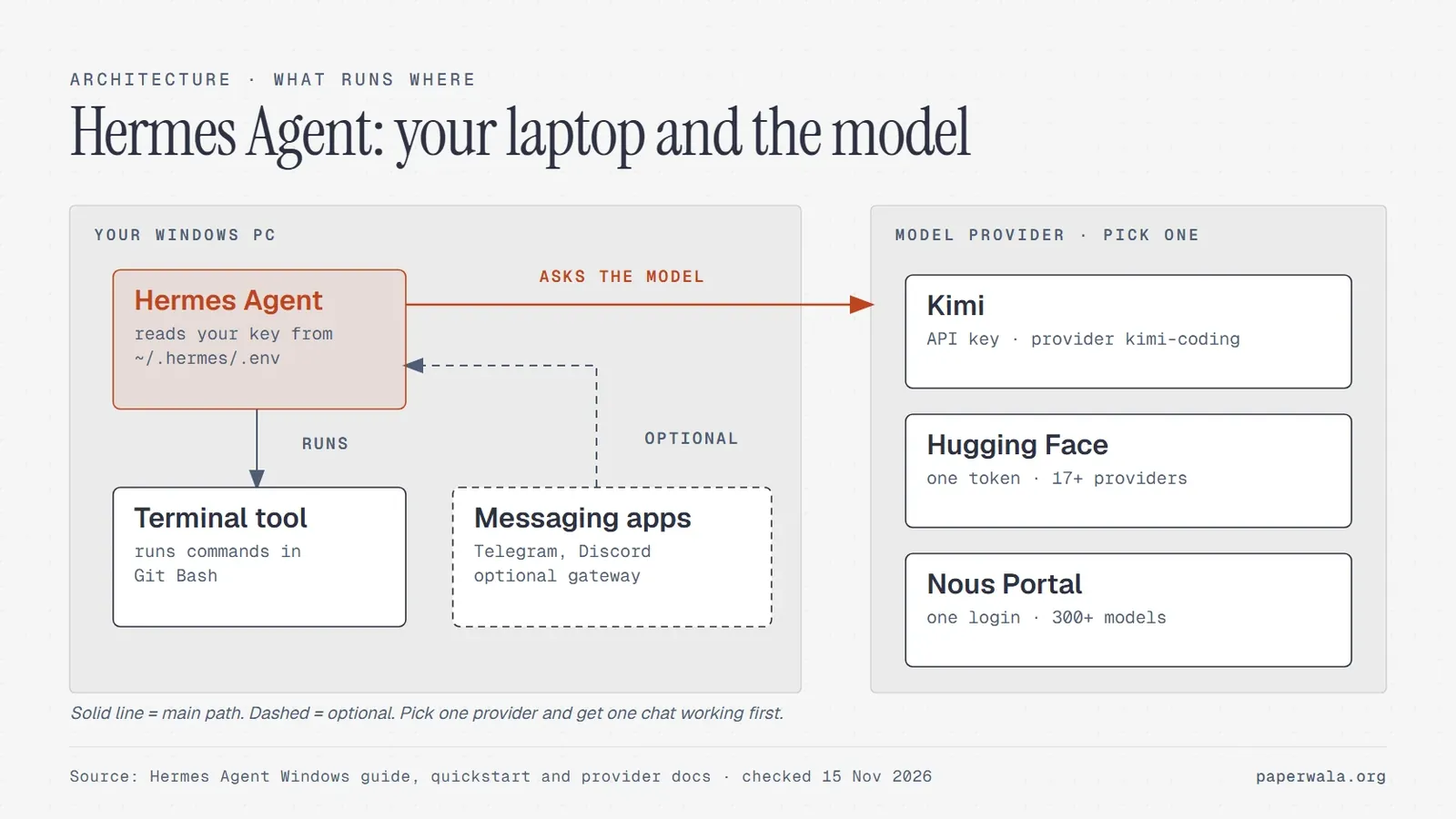
What is the easiest route?
The Windows guide points to Nous Portal. One subscription covers the model and extra tools such as web search, all through one login. Run this after the installer finishes:
hermes setup --portalThe guide says it logs you in, sets Nous as your provider and turns on the tool gateway.
How do you connect Kimi?
The Kimi guide says the API key is shown only once. Copy it somewhere safe before you close the page.
- Create the key in the API Keys section of the Kimi platform.
- In the Hermes setup, choose the provider
kimi-coding. - Enter the key. Hermes stores it as
KIMI_API_KEYin the file~/.hermes/.env. - Pick a model. The Kimi guide names
kimi-k2.6.
Model names change often. Hugging Face already lists a newer Kimi model than the one in the Kimi guide. Choose the current model inside hermes model and do not copy a name from an old post.
Can you use Hugging Face models instead?
Yes. The Hugging Face docs say Hermes supports Inference Providers natively. That gives you hundreds of open models from more than 17 providers through one token.
- Create a Hugging Face token with the permission called Make calls to Inference Providers.
- Add the line
HF_TOKEN=hf_...to~/.hermes/.env, with your own token in place of the dots. - Run
hermes modeland choose Hugging Face, or start a chat withhermes chat --provider hf.
Our post on the MCP filesystem server setup shows why a small test folder matters when an AI app can touch your files.
How do you update Hermes Agent on Windows?
The method depends on how you installed it. The official updating guide lists one way for each install type. The stable channel is the default.
| How you installed it | How you update |
|---|---|
| PowerShell script (source checkout) | Run hermes update |
| Desktop installer from the website | Use the Update control in the app, or Windows App Installer |
| Microsoft Store | Update it from the Store |
To follow the newer main channel instead of stable, the guide gives hermes update --set-channel main.
Where can it go wrong on day one?
- If the terminal says
hermes: command not found, close PowerShell and open a new window. The installation guide says to reload your shell or check that the launcher folder is on your PATH. Then runhermes doctor. - If you lost your Kimi key, make a new one, because Kimi shows it only once.
- If a model name is rejected, choose the model from the list inside
hermes model. - If the desktop installer will not open, check your Windows version. It needs Windows 11 22H2 or newer.
- If it all feels like too much, skip messaging apps and extras until one plain chat works.
Hermes can run commands on your computer. Keep your real notes and projects somewhere else until you trust it.
What I would do next: install it, then run hermes model and finish one chat in the test folder. When I run these steps on my own laptop I will add the real results here.
Frequently asked questions
Do I need WSL2 to install Hermes Agent on Windows?
No. The official Windows guide calls WSL an alternative. It lists a native command that runs in PowerShell.
Does Hermes Agent work on Windows 10?
Yes, through the PowerShell script. The desktop package needs Windows 11 22H2 or later, so on Windows 10 use the script.
Is Hermes Agent free?
The software is free and MIT licensed. The model you connect can cost money, depending on the provider. Check each provider's billing page.
How do I update Hermes Agent?
Run hermes update if you used the PowerShell script. The desktop app has its own Update control. The Store version updates from the Store. To check an install, run hermes doctor.
Is Hermes Agent safe to run on my laptop?
It can run commands, so go slowly. Use a test folder and read install scripts before you run them. Keep API keys out of public files.
Sources
- Hermes Agent Windows (native) guide (official)
- Hermes Agent installation guide (official)
- Hermes Agent quickstart (official)
- Hermes Agent source code on GitHub
- Hermes Agent vs OpenClaw (official comparison)
- Hermes Agent on Hugging Face Inference Providers
- The Complete Guide to Hermes Agent (Kimi)
- Hermes Agent review (AI Tested Guide)
- Hermes Agent vs OpenClaw vs Claude Code (Crewmark AI)
- Hermes Agent docs: Updating
Checked on 2026-11-15
Comments
No comments yet. Start the discussion.